The Principia Machina/Tools/General reader: Difference between revisions
DeltaS Zero (talk | contribs) Physics tools, in plain language: the three jobs, a pendulum from law to numbers, four ways to cut up space, choosing a tool, what TPM does with a tool's answer; 9 diagrams (tpm_tools 0.1.0) |
Published from the Principia Machina source |
||
| (3 intermediate revisions by 2 users not shown) | |||
| Line 1: | Line 1: | ||
{{DISPLAYTITLE:Physics tools, in plain language}} | {{DISPLAYTITLE:Physics tools, in plain language}} | ||
''For anyone curious. What a physics tool is for, one small example taken from a law all the way to numbers, which tool answers which question, and what [[The Principia Machina|the Principia Machina]] does with a tool's answer. You do not need to follow any equation to read this page. Operators have [[The Principia Machina/Tools/Operator's guide|their own guide]], and AI agents [[The Principia Machina/Agent/Tools|their own page]]. All three start from [[The Principia Machina/Tools|the front page]].'' | {{Research Toolkit map}} | ||
''For anyone curious. What a physics tool is for, one small example taken from a law all the way to numbers, which tool answers which question, and what [[The Principia Machina|the Principia Machina]] does with a tool's answer. You do not need to follow any equation to read this page. Operators have [[The Principia Machina/Tools/Operator's guide|their own guide]], and AI agents [[The Principia Machina/Agent/Tools|their own page]]. All three start from [[The Principia Machina/Tools|the front page]]. The tools are one part of the [[The Principia Machina/Research Toolkit|Research Toolkit]], which also covers how to do the research and how an AI should go about it.'' | |||
== 1 Three jobs between an idea and a number == | == 1 Three jobs between an idea and a number == | ||
| Line 7: | Line 7: | ||
A physical theory starts as an idea and has to end as a number someone can measure. Between the two lie three jobs. People did all three by hand for centuries: Kepler ''found'' his laws in Tycho Brahe's tables of planet positions; Lagrange and Hamilton showed how to ''derive'' the equations of motion from a single quantity, the action ([[Hamilton's principle]]); and astronomers ''solved'' those equations, line by line, to predict where a planet would be. | A physical theory starts as an idea and has to end as a number someone can measure. Between the two lie three jobs. People did all three by hand for centuries: Kepler ''found'' his laws in Tycho Brahe's tables of planet positions; Lagrange and Hamilton showed how to ''derive'' the equations of motion from a single quantity, the action ([[Hamilton's principle]]); and astronomers ''solved'' those equations, line by line, to predict where a planet would be. | ||
The tools on these pages are computer programs for the same three jobs. | The tools on these pages are computer programs for the same three jobs, and one tool, added in October 2026, does a fourth: it checks a step of the reasoning by machine. | ||
* '''Find''': look at data and find the rule behind it. | * '''Find''': look at data and find the rule behind it. | ||
* '''Derive''': start from a rule and work out the equations it implies. | * '''Derive''': start from a rule and work out the equations it implies. | ||
* '''Solve''': start from the equations and work out the numbers. | * '''Solve''': start from the equations and work out the numbers. | ||
* '''Check''': have a machine confirm that a step of the argument really follows. | |||
<graphviz> | <graphviz> | ||
// The three jobs, and the loop they make. | // The three jobs, the check beside them, and the loop they make. | ||
digraph jobs { | digraph jobs { | ||
node [shape=box, style=filled, fillcolor="#eaecf0", color="#a2a9b1", fontcolor="#202122", fontname="Helvetica", fontsize=10]; edge [fontname="Helvetica", fontsize=9, color="#54595d", fontcolor="#202122"]; | |||
rankdir=TB; | |||
D [label="DATA\nmeasurements,\nobservations", shape=folder]; | D [label="DATA\nmeasurements,\nobservations", shape=folder]; | ||
A [label="A RULE\nthe action: | A [label="A RULE\nthe action: one quantity\nthat sums up the system", fillcolor="#cedff2"]; | ||
E [label="EQUATIONS\nhow each part moves", fillcolor="#cedff2"]; | E [label="EQUATIONS\nhow each part moves", fillcolor="#cedff2"]; | ||
N [label="NUMBERS\na prediction you | N [label="NUMBERS\na prediction you can measure", fillcolor="#cef2e0"]; | ||
D -> A [label="FIND\ | CK [label="CHECK\na machine confirms a step\n(Lean with Mathlib\nand Physlib)", fillcolor="#ffedad"]; | ||
A -> E [label="DERIVE\ | D -> A [label="FIND\nPySR, AI Feynman,\nPySINDy, Lagrangian networks", color="#ac6600", fontcolor="#ac6600"]; | ||
E -> N [label="SOLVE\ | A -> E [label="DERIVE\nCadabra2, ModelingToolkit.jl, SymPy,\nSageMath, xAct, FORM, FeynCalc", color="#3366cc", fontcolor="#3366cc"]; | ||
N -> D [label="COMPARE\nonly at the | E -> N [label="SOLVE\nFEniCS, Devito, Dedalus, DeepXDE, FiPy, Clawpack,\nEinstein Toolkit, SpECTRE, QuTiP, Modelica", color="#14866d", fontcolor="#14866d"]; | ||
N -> D [label="COMPARE\nonly at the\nvery end", style=dashed, constraint=false]; | |||
CK -> A [style=dotted, arrowhead=none]; CK -> E [style=dotted, arrowhead=none]; | |||
} | } | ||
</graphviz> | </graphviz> | ||
| Line 64: | Line 68: | ||
</graphviz> | </graphviz> | ||
== 3 Solving a field: | == 3 Solving a field: five ways to cut up space == | ||
A pendulum has one moving part. A field, such as the electromagnetic field in a cavity or a wave crossing a room, has a value at every point of space. A computer cannot hold infinitely many points, so each solver cuts space up in its own way. That choice is most of what separates the field solvers on these pages. | A pendulum has one moving part. A field, such as the electromagnetic field in a cavity or a wave crossing a room, has a value at every point of space. A computer cannot hold infinitely many points, so each solver cuts space up in its own way. That choice is most of what separates the field solvers on these pages. | ||
| Line 72: | Line 76: | ||
* '''Cells that trade with their neighbours''' ([[The Principia Machina/Tools/FiPy|FiPy]], [[The Principia Machina/Tools/Clawpack|Clawpack]]): space as boxes, and whatever leaves one box enters the next, so nothing is created or lost by rounding. Clawpack also follows sharp fronts, such as shocks. | * '''Cells that trade with their neighbours''' ([[The Principia Machina/Tools/FiPy|FiPy]], [[The Principia Machina/Tools/Clawpack|Clawpack]]): space as boxes, and whatever leaves one box enters the next, so nothing is created or lost by rounding. Clawpack also follows sharp fronts, such as shocks. | ||
* '''No grid at all''' ([[The Principia Machina/Tools/DeepXDE|DeepXDE]]): a neural network is bent until the field it describes obeys the equations everywhere at once. | * '''No grid at all''' ([[The Principia Machina/Tools/DeepXDE|DeepXDE]]): a neural network is bent until the field it describes obeys the equations everywhere at once. | ||
* '''A sum of smooth waves''' ([[The Principia Machina/Tools/Dedalus|Dedalus]]): the field written as a sum of simple wave shapes, very accurate when the field is smooth. | |||
<graphviz> | <graphviz> | ||
// | // Five ways a field solver cuts up space. | ||
digraph cuts { | digraph cuts { | ||
node [shape=box, style=filled, fillcolor="#eaecf0", color="#a2a9b1", fontcolor="#202122", fontname="Helvetica", fontsize=10]; edge [fontname="Helvetica", fontsize=9, color="#54595d", fontcolor="#202122"]; | |||
F [label="A FIELD\na value at | rankdir=LR; | ||
G [label="GRID | F [label="A FIELD\na value at\nevery point\n(infinitely many)", fillcolor="#cedff2"]; | ||
M [label="MESH | G [label="GRID: graph paper; neighbours\nestimate change -- Devito", fillcolor="#cef2e0"]; | ||
V [label="CELLS | M [label="MESH: triangles that follow\ncurved walls -- FEniCS", fillcolor="#cef2e0"]; | ||
N [label="NO GRID | V [label="CELLS: what leaves one box\nenters the next -- FiPy, Clawpack", fillcolor="#cef2e0"]; | ||
F -> G [label="finite | N [label="NO GRID: a neural network bent\nto obey the equations -- DeepXDE", fillcolor="#cef2e0"]; | ||
S [label="SMOOTH WAVES: a sum of simple\nwave shapes -- Dedalus", fillcolor="#cef2e0"]; | |||
F -> G [label="finite difference"]; F -> M [label="finite element"]; F -> V [label="finite volume"]; F -> N [label="physics-informed network"]; F -> S [label="spectral"]; | |||
} | } | ||
</graphviz> | </graphviz> | ||
Four more solvers work in worlds of their own: the [[The Principia Machina/Tools/EinsteinToolkit|Einstein Toolkit]] and [[The Principia Machina/Tools/SpECTRE|SpECTRE]] solve the equations of general relativity, where space and time themselves move; [[The Principia Machina/Tools/QuTiP|QuTiP]] solves quantum systems that leak into their surroundings; and [[The Principia Machina/Tools/Modelica|Modelica]] solves machines made of connected parts, such as linkages and circuits, where there is no field at all. | |||
== 4 Which tool for which question == | == 4 Which tool for which question == | ||
| Line 95: | Line 102: | ||
// Which tool answers which question. | // Which tool answers which question. | ||
digraph choose { | digraph choose { | ||
node [shape=box, style=filled, fillcolor="#eaecf0", color="#a2a9b1", fontcolor="#202122", fontname="Helvetica", fontsize=10]; edge [fontname="Helvetica", fontsize=9, color="#54595d", fontcolor="#202122"]; | |||
Q [label="What are | rankdir=LR; | ||
Q [label="What are\nyou asking?", shape=ellipse, fillcolor="#ffffff"]; | |||
F1 [label="What rule is behind\nthis data?", shape=diamond, fillcolor="#ffedad"]; | F1 [label="What rule is behind\nthis data?", shape=diamond, fillcolor="#ffedad"]; | ||
D1 [label="What equations does\nthis rule imply?", shape=diamond, fillcolor="#cedff2"]; | D1 [label="What equations does\nthis rule imply?", shape=diamond, fillcolor="#cedff2"]; | ||
S1 [label="What happens next?", shape=diamond, fillcolor="#cef2e0"]; | S1 [label="What happens next?", shape=diamond, fillcolor="#cef2e0"]; | ||
PY [label="PySR | C1 [label="Does this step\nreally follow?", shape=diamond, fillcolor="#fee7e6"]; | ||
CA [label="Cadabra2 | PY [label="PySR: a formula,\nsimplest first"]; AF [label="AI Feynman: symmetries\nand units first"]; | ||
W [label="Waves in a box? | LN [label="Lagrangian networks:\nthe rule itself"]; SI [label="PySINDy: equations,\nno rule assumed"]; | ||
CA [label="Cadabra2, xAct: tensors and fields"]; MT [label="ModelingToolkit.jl: connected parts"]; | |||
Q -> F1; Q -> D1; Q -> S1; | SY [label="SymPy, SageMath: free\nalgebra and geometry"]; QF [label="FeynCalc, FORM:\nquantum fields"]; | ||
F1 -> PY; F1 -> AF; D1 -> CA; D1 -> MT; | W [label="Waves in a box? Devito"]; SH [label="Shocks and fronts? Clawpack"]; SW [label="Curved walls? FEniCS\nor DeepXDE"]; | ||
S1 -> W; S1 -> SH; S1 -> SW; S1 -> CV; S1 -> ST; S1 -> QU; S1 -> MA; | SM [label="Smooth fields? Dedalus"]; CV [label="Nothing lost? FiPy"]; ST [label="Space and time? Einstein\nToolkit, SpECTRE"]; | ||
QU [label="Quantum, leaking? QuTiP"]; MA [label="Machines, circuits? Modelica"]; | |||
LE [label="Lean, Mathlib, Physlib:\na checked proof"]; | |||
Q -> F1; Q -> D1; Q -> S1; Q -> C1; | |||
F1 -> PY; F1 -> AF; F1 -> LN; F1 -> SI; D1 -> CA; D1 -> MT; D1 -> SY; D1 -> QF; | |||
S1 -> W; S1 -> SH; S1 -> SW; S1 -> SM; S1 -> CV; S1 -> ST; S1 -> QU; S1 -> MA; C1 -> LE; | |||
} | } | ||
</graphviz> | </graphviz> | ||
The survey gives each tool a score out of ten for four kinds of work: actions, fields, relativity, and quantum systems or data. The scores are the survey's own judgments, not measurements; the [[The Principia Machina/Tools#The survey's scores at a glance|front page]] charts all | The survey gives each tool a score out of ten for four kinds of work: actions, fields, relativity, and quantum systems or data. The scores are the survey's own judgments, not measurements; the [[The Principia Machina/Tools#The survey's scores at a glance|front page]] charts all eighty-eight of them. The ten tools added in October 2026 were scored by a different hand from the original twelve, as that page explains. | ||
{{#mermaid: | {{#mermaid: | ||
pie showData | pie showData | ||
title The | title The twenty-two tools by job | ||
"Find - PySR, AI Feynman" : | "Find - PySR, AI Feynman, PySINDy, Lagrangian networks" : 4 | ||
"Derive - Cadabra2, ModelingToolkit.jl" : | "Derive - Cadabra2, ModelingToolkit.jl, SymPy, SageMath, xAct, FORM, FeynCalc" : 7 | ||
"Solve fields - Devito, FEniCS, FiPy, Clawpack, DeepXDE" : | "Check - Lean with Mathlib and Physlib" : 1 | ||
"Solve special worlds - Einstein Toolkit, QuTiP, Modelica" : | "Solve fields - Devito, FEniCS, FiPy, Clawpack, DeepXDE, Dedalus" : 6 | ||
"Solve special worlds - Einstein Toolkit, SpECTRE, QuTiP, Modelica" : 4 | |||
|config.theme=neutral}} | |config.theme=neutral}} | ||
| Line 135: | Line 149: | ||
// A tool's answer, from the tool to the public record. | // A tool's answer, from the tool to the public record. | ||
digraph answer { | digraph answer { | ||
node [shape=box, style=filled, fillcolor="#eaecf0", color="#a2a9b1", fontcolor="#202122", fontname="Helvetica", fontsize=10]; edge [fontname="Helvetica", fontsize=9, color="#54595d", fontcolor="#202122"]; | |||
T [label="A TOOL'S ANSWER\non someone's | rankdir=TB; | ||
R [label="1 A NUMBERED ENTRY\nsteps, assumptions, | T [label="A TOOL'S ANSWER\non someone's own computer", fillcolor="#ffedad"]; | ||
C [label="2 FORM CHECKED\nfields, units, | R [label="1 A NUMBERED ENTRY\nsteps, assumptions, conditions written out", fillcolor="#cedff2"]; | ||
W [label="THE REGISTER\non the wiki, | C [label="2 FORM CHECKED\nfields, units, fingerprints (TPX)"]; | ||
P [label="3 REDONE\nby another AI, | W [label="THE REGISTER\non the wiki, public", shape=box3d, fillcolor="#cef2e0"]; | ||
V [label="4 COMPARED\nwith a measurement, | P [label="3 REDONE\nby another AI, not shown the answer", fillcolor="#cedff2"]; | ||
T -> R -> C -> W; W -> P [label="a match adds support;\na mismatch is logged"] | V [label="4 COMPARED\nwith a measurement, after the work", fillcolor="#cef2e0"]; | ||
T -> R -> C -> W; W -> P [label="a match adds support;\na mismatch is logged"]; W -> V [label="the difference\nis recorded"]; | |||
} | } | ||
</graphviz> | </graphviz> | ||
| Line 171: | Line 186: | ||
// A tool cannot change a kernel; a new law starts a new container. | // A tool cannot change a kernel; a new law starts a new container. | ||
digraph kernel { | digraph kernel { | ||
node [shape=box, style=filled, fillcolor="#eaecf0", color="#a2a9b1", fontcolor="#202122", fontname="Helvetica", fontsize=10]; edge [fontname="Helvetica", fontsize=9, color="#54595d", fontcolor="#202122"]; | |||
rankdir=TB; | |||
TOOL [label="a tool finds | TOOL [label="a tool finds a different\nlaw in the data", fillcolor="#ffedad"]; | ||
NO [label="edit kernel A?\nREFUSED", fillcolor="#fee7e6"]; | NO [label="edit kernel A?\nREFUSED", fillcolor="#fee7e6"]; | ||
NEW [label="CONTAINER B\nnew kernel, new name,\ | OLD [label="CONTAINER A\nkernel A (fixed), its register", shape=box3d, fillcolor="#cef2e0"]; | ||
TOOL -> NO [style=dashed]; | NEW [label="CONTAINER B\nnew kernel, new name, checked\nfrom the start, declared by a person", shape=box3d, fillcolor="#cedff2"]; | ||
TOOL -> NO [style=dashed]; TOOL -> NEW [label="the only way in"]; | |||
OLD -> NEW [label="may be copied forward;\nA is never changed", style=dashed]; | OLD -> NEW [label="may be copied forward;\nA is never changed", style=dashed]; | ||
{ rank=same; NO; OLD; } | |||
} | } | ||
</graphviz> | </graphviz> | ||
A tool also cannot vouch for itself. A program can have bugs, and two runs of the same program share them. That is why the redo in step 3 is done by a different AI, and why the comparison in step 4 uses a measurement from outside. | A tool also cannot vouch for itself. A program can have bugs, and two runs of the same program share them. That is why the redo in step 3 is done by a different AI, and why the comparison in step 4 uses a measurement from outside. The ways of checking a tool's answer before anyone else does (units on every line, the easy limits, a second route to the same result, a machine-checked proof of a key step) are on the [[The Principia Machina/Research Toolkit/Research methods|research methods]] page. | ||
== 8 A day's work, start to finish == | == 8 A day's work, start to finish == | ||
| Line 206: | Line 222: | ||
|config.theme=neutral}} | |config.theme=neutral}} | ||
== 9 The | == 9 The twenty-two tools in one table == | ||
{| class="wikitable sortable" | {| class="wikitable sortable" | ||
| Line 234: | Line 250: | ||
|- | |- | ||
| [[The Principia Machina/Tools/Modelica|Modelica]] || solve || Solves machines and circuits built from connected parts. | | [[The Principia Machina/Tools/Modelica|Modelica]] || solve || Solves machines and circuits built from connected parts. | ||
|- | |||
| colspan="3" style="background:#eaecf0;" | ''Added on 2026-10-06'' | |||
|- | |||
| [[The Principia Machina/Tools/SymPy|SymPy]] || derive || Turns a written Lagrangian into equations of motion, free, and keeps the units with them. | |||
|- | |||
| [[The Principia Machina/Tools/SageMath|SageMath]] || derive || Works out the shape of curved space: curvature, symmetries, the paths of free fall. | |||
|- | |||
| [[The Principia Machina/Tools/xAct|xAct]] || derive || Does the heavy tensor algebra of gravity, and pushes an action to the next order. | |||
|- | |||
| [[The Principia Machina/Tools/FORM|FORM]] || derive || Handles the enormous expressions of quantum field theory, too big for memory. | |||
|- | |||
| [[The Principia Machina/Tools/FeynCalc|FeynCalc]] || derive || Turns a Lagrangian into the rules for particle collisions, step by step. | |||
|- | |||
| [[The Principia Machina/Tools/Physlib|Lean with Mathlib and Physlib]] || check || Has a machine confirm that a step of the argument really follows. | |||
|- | |||
| [[The Principia Machina/Tools/LagrangianNN|Lagrangian networks]] || find || Learns the action itself from recorded motion, with energy kept by design. | |||
|- | |||
| [[The Principia Machina/Tools/PySINDy|PySINDy]] || find || Finds the fewest equations that fit the data, assuming no action: a fair comparison. | |||
|- | |||
| [[The Principia Machina/Tools/Dedalus|Dedalus]] || solve || Solves smooth fields very accurately as sums of simple waves. | |||
|- | |||
| [[The Principia Machina/Tools/SpECTRE|SpECTRE]] || solve || Simulates colliding black holes and neutron stars; a second check beside the Einstein Toolkit. | |||
|} | |} | ||
| Line 241: | Line 279: | ||
* [[The Principia Machina/Hub/General reader|The walk through]] – the Principia Machina itself, from the beginning. | * [[The Principia Machina/Hub/General reader|The walk through]] – the Principia Machina itself, from the beginning. | ||
* [[The Principia Machina/Tools/Operator's guide|The operator's guide to the tools]] – the same ground, with the rules. | * [[The Principia Machina/Tools/Operator's guide|The operator's guide to the tools]] – the same ground, with the rules. | ||
* [[The Principia Machina/Research Toolkit|The Research Toolkit]] – the tools' place beside the methods of research and the way an AI agent should work. | |||
* [[The Principia Machina/Tools|Back to the front page]] and the full survey. | * [[The Principia Machina/Tools|Back to the front page]] and the full survey. | ||
[[Category:The Principia Machina]] [[Category:Tools]] | [[Category:The Principia Machina]] [[Category:Tools]] | ||
Latest revision as of 19:33, 15 October 2026
| Research Toolkit: map |
|---|
| Reading the toolkit Arriving as an AI? The manual Agent flow control Research methods Research tools Bibliography |
| The physics tools The survey In plain language The operator's guide The primer |
| For AI agents The toolkit as a card The tools, machine-optimized |
| Related The Principia Machina |
For anyone curious. What a physics tool is for, one small example taken from a law all the way to numbers, which tool answers which question, and what the Principia Machina does with a tool's answer. You do not need to follow any equation to read this page. Operators have their own guide, and AI agents their own page. All three start from the front page. The tools are one part of the Research Toolkit, which also covers how to do the research and how an AI should go about it.
1 Three jobs between an idea and a number
A physical theory starts as an idea and has to end as a number someone can measure. Between the two lie three jobs. People did all three by hand for centuries: Kepler found his laws in Tycho Brahe's tables of planet positions; Lagrange and Hamilton showed how to derive the equations of motion from a single quantity, the action (Hamilton's principle); and astronomers solved those equations, line by line, to predict where a planet would be.
The tools on these pages are computer programs for the same three jobs, and one tool, added in October 2026, does a fourth: it checks a step of the reasoning by machine.
- Find: look at data and find the rule behind it.
- Derive: start from a rule and work out the equations it implies.
- Solve: start from the equations and work out the numbers.
- Check: have a machine confirm that a step of the argument really follows.
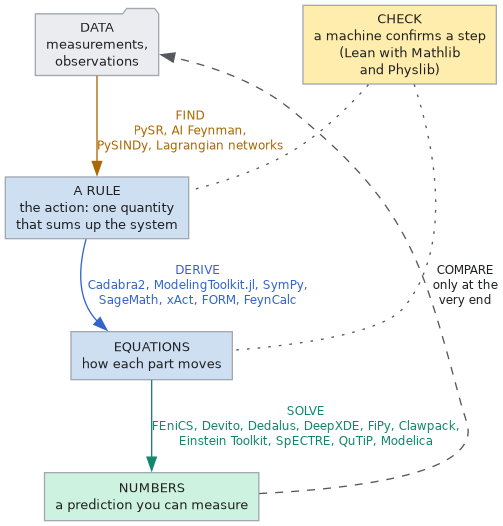
The dashed arrow matters. A prediction is compared with a measurement only after the work is done, never while it is being done. Section 6 explains why.
2 One example, all the way through: a pendulum
A weight on a string, swinging. Here is the whole road from rule to number, once, so the rest of the page has something to hang on.
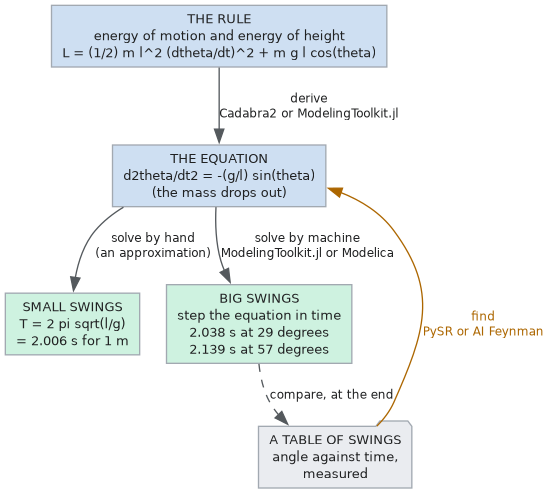
The rule. The action of a pendulum is built from two energies: the energy of motion and the energy of height. Written out, with m the mass, ℓ the string's length, g gravity and θ the angle from straight down:
Derived. Hamilton's principle turns that one line into the equation of motion. A symbolic tool such as Cadabra2 or ModelingToolkit.jl does this step the way a physicist does it on paper:
Notice that the mass has dropped out. The tool did not decide that; the mathematics did.
Solved. For small swings the equation has a famous answer: the time for one full swing is
For a string 1 m long (about 3.3 ft) and g = 9.81 m/s², that is 2.006 seconds. For bigger swings there is no such short formula, and a solver steps the equation forward in time instead. It gives 2.038 s for a swing of 0.5 radian (about 29°) and 2.139 s for 1 radian (about 57°). The short formula is 1.6 per cent too fast at 29° and 6 per cent too fast at 57°.
Found, the other way round. Hand a tool such as PySR a long table of measured angles and times, and it can search for the equation that reproduces the table, and find without being told it.
3 Solving a field: five ways to cut up space
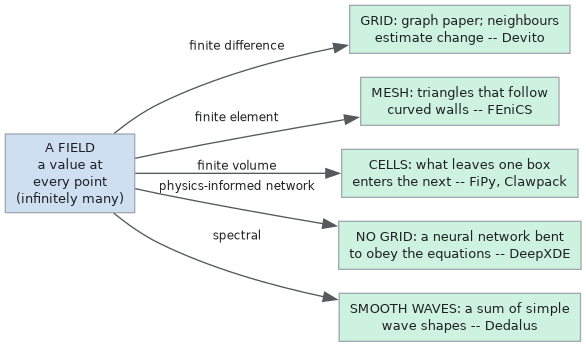
A pendulum has one moving part. A field, such as the electromagnetic field in a cavity or a wave crossing a room, has a value at every point of space. A computer cannot hold infinitely many points, so each solver cuts space up in its own way. That choice is most of what separates the field solvers on these pages.
- A regular grid (Devito): space as graph paper. Each point looks at its neighbours to estimate how fast the field changes. Fast and simple; best for waves in simple boxes.
- A mesh of small shapes (FEniCS): space tiled with triangles or tetrahedra that follow curved walls. The action is added up shape by shape.
- Cells that trade with their neighbours (FiPy, Clawpack): space as boxes, and whatever leaves one box enters the next, so nothing is created or lost by rounding. Clawpack also follows sharp fronts, such as shocks.
- No grid at all (DeepXDE): a neural network is bent until the field it describes obeys the equations everywhere at once.
- A sum of smooth waves (Dedalus): the field written as a sum of simple wave shapes, very accurate when the field is smooth.
Four more solvers work in worlds of their own: the Einstein Toolkit and SpECTRE solve the equations of general relativity, where space and time themselves move; QuTiP solves quantum systems that leak into their surroundings; and Modelica solves machines made of connected parts, such as linkages and circuits, where there is no field at all.
4 Which tool for which question
Start from the question you are asking, not from the tool.
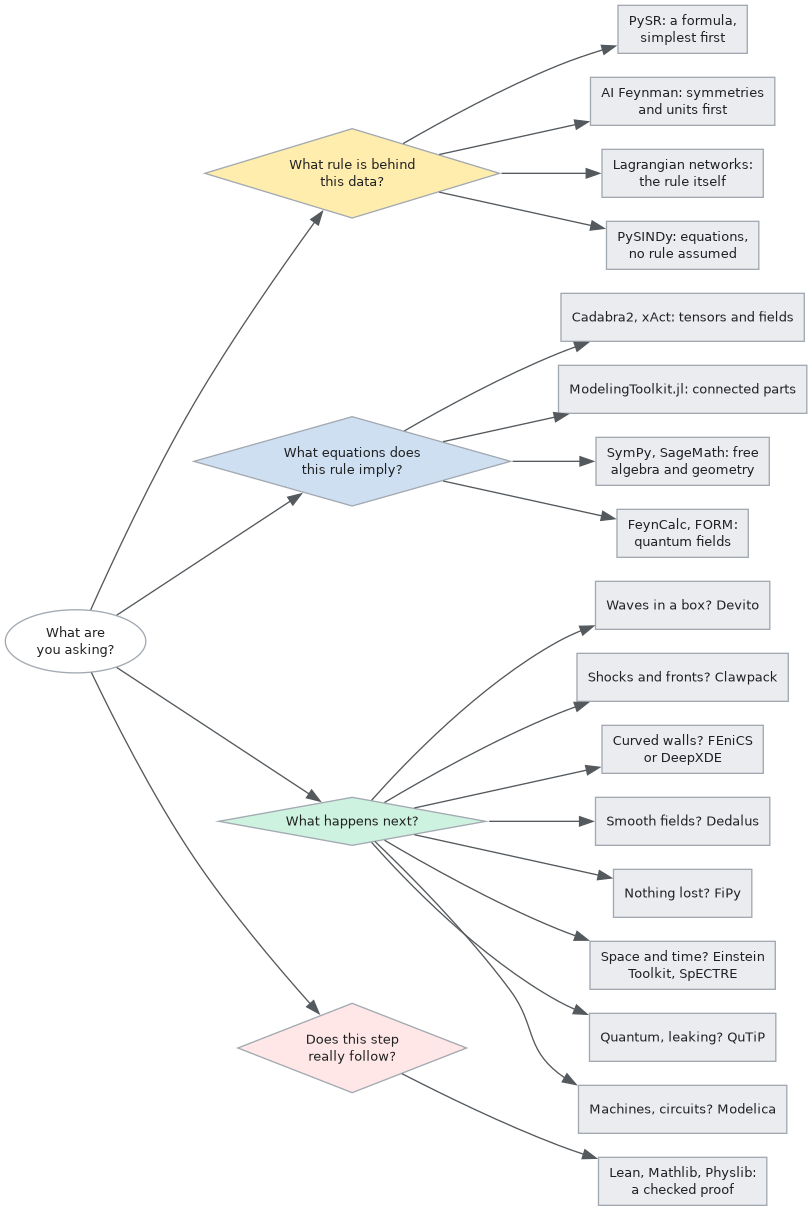
The survey gives each tool a score out of ten for four kinds of work: actions, fields, relativity, and quantum systems or data. The scores are the survey's own judgments, not measurements; the front page charts all eighty-eight of them. The ten tools added in October 2026 were scored by a different hand from the original twelve, as that page explains.
The survey's own plain-language primer sorts the same tools into four families and gives each a picture to remember it by: the prospectors, the approximators, the wave engines and the architects.
5 What the Principia Machina does with a tool's answer
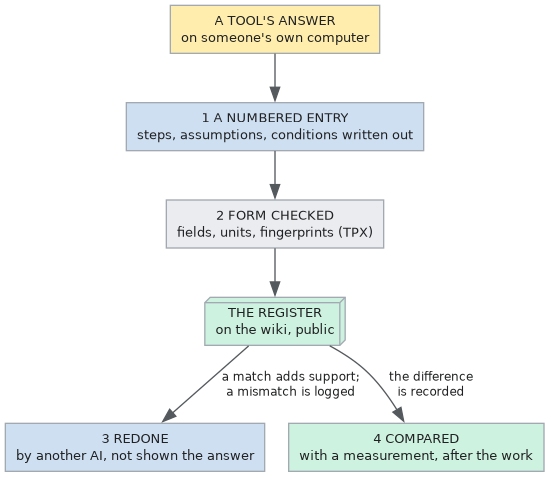
The Principia Machina is a way of doing research with AI so that anyone can check the result afterwards. A tool's answer is never taken on the tool's word. It goes through the same steps as every other finding.
- It is written down as a numbered entry in the register of a research container, with its steps and its starting assumptions spelled out, and the conditions it was worked under (for the pendulum: the string length, the starting angle).
- A machine checks its form, not its physics: that every field is filled in, that the units agree, that the fingerprints of the text match. The server, TPX, never runs the physics tool.
- Another AI redoes it from the same starting point, without being shown the first answer. If both agree, the finding gains support; if not, the disagreement is logged in public.
- Only then is it compared with the world: a measured value from outside is set beside it, and the difference is written down. Agreement is never claimed in words; the numbers speak.
6 Why the answer is not shown the target
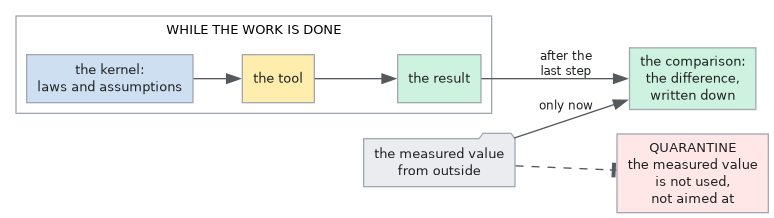
If you know the answer you want, it is easy to steer a calculation towards it without meaning to: a slightly different mesh here, a different starting guess there. So the Principia Machina keeps the measured value out of sight until the derivation is finished. It calls this benchmark quarantine. A tool that was fitted to a set of data cannot then be tested against that same data: that would be grading a student with the answer key it studied from.
7 What a tool cannot do here
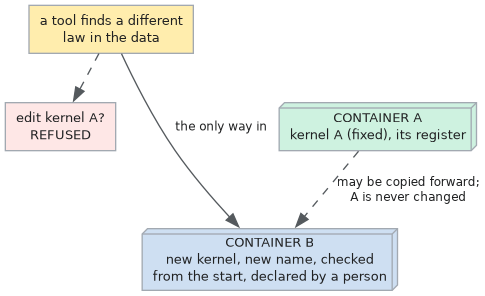
Each research container rests on a kernel: the laws and assumptions everyone agreed to hold fixed for that piece of research (the walk through, page 2). A tool cannot change it. If a tool finds a better law in the data, that law does not slip into the old container. It becomes the starting point of a new one, with a new name, checked from the beginning and declared by a named person. The old container and everything in it stay exactly as they were.
A tool also cannot vouch for itself. A program can have bugs, and two runs of the same program share them. That is why the redo in step 3 is done by a different AI, and why the comparison in step 4 uses a measurement from outside. The ways of checking a tool's answer before anyone else does (units on every line, the easy limits, a second route to the same result, a machine-checked proof of a key step) are on the research methods page.
8 A day's work, start to finish
9 The twenty-two tools in one table
| Tool | Its job | In one line |
|---|---|---|
| PySR | find | Searches millions of formulas for the simplest one that fits the data. |
| AI Feynman | find | Looks for symmetries and checks units first, then searches for the formula. |
| Cadabra2 | derive | Does field-theory algebra with indices and tensors, as a physicist would on paper. |
| ModelingToolkit.jl | derive and solve | Turns an action for a system of parts into equations, simplifies them, and solves them. |
| FEniCS | solve | Solves fields on meshes that follow curved shapes, adding up the action piece by piece. |
| Devito | solve | Writes fast code for waves on regular grids, from equations written in ordinary notation. |
| DeepXDE | solve | Bends a neural network until it obeys the equations everywhere; no grid needed. |
| FiPy | solve | Moves quantities between cells so that nothing is created or lost. |
| Clawpack | solve | Follows sharp fronts and shocks without smearing them out. |
| Einstein Toolkit | solve | Evolves space and time themselves, as general relativity describes them. |
| QuTiP | solve | Follows quantum systems that exchange energy with their surroundings. |
| Modelica | solve | Solves machines and circuits built from connected parts. |
| Added on 2026-10-06 | ||
| SymPy | derive | Turns a written Lagrangian into equations of motion, free, and keeps the units with them. |
| SageMath | derive | Works out the shape of curved space: curvature, symmetries, the paths of free fall. |
| xAct | derive | Does the heavy tensor algebra of gravity, and pushes an action to the next order. |
| FORM | derive | Handles the enormous expressions of quantum field theory, too big for memory. |
| FeynCalc | derive | Turns a Lagrangian into the rules for particle collisions, step by step. |
| Lean with Mathlib and Physlib | check | Has a machine confirm that a step of the argument really follows. |
| Lagrangian networks | find | Learns the action itself from recorded motion, with energy kept by design. |
| PySINDy | find | Finds the fewest equations that fit the data, assuming no action: a fair comparison. |
| Dedalus | solve | Solves smooth fields very accurately as sums of simple waves. |
| SpECTRE | solve | Simulates colliding black holes and neutron stars; a second check beside the Einstein Toolkit. |
Where to go next
- Hamilton's principle – the rule behind the derive arrow, with a plain-language counterpart for every page that carries equations.
- The walk through – the Principia Machina itself, from the beginning.
- The operator's guide to the tools – the same ground, with the rules.
- The Research Toolkit – the tools' place beside the methods of research and the way an AI agent should work.
- Back to the front page and the full survey.